
The Gimme Getter is a training app that delivers random suggestions, tracks time, and counts repetitions. It can even serve as a virtual partner when you’re training by yourself.
Below you’ll find:
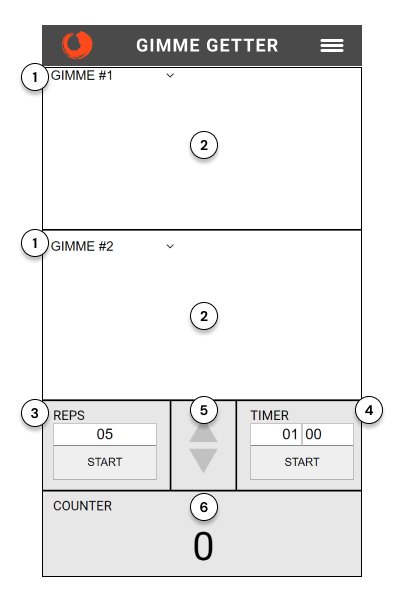
1) Select the gimme category – Tap Gimme #1 or Gimme #2 to select the category of gimmes to display.
2) Display a random gimme – Tap in the display display area to display a random gimme.
3) Do reps – Click Start to automatically show a new gimme at the end of each rep interval.
4) Countdown timer – Tap Start to count down from the time displayed with an audio signal when the countdown is done. Double-click on Start to run the timer and the reps at the same time
5) Time adjustment – Tap in the Reps or Timer time windows and then increase or decrease the time.
6) Counter – Tap in the counter area to increase by 1. Tap the Counter title to reset the number to 0
Timed work – To do the Opening fist exercise for one minute without keeping an eye on the clock, set the Gimme Getter timer, tap start, and begin the exercise. You can now focus exclusively on your slowly opening fist. When time is up, the Gimme Getter plays an audio alert.
Counter tracking – To do Random access drill and track how many words you come up with in a minute, set and start the timer. For each random word that you say, tap the counter. After sixty seconds, the Gimme Getter plays the done sound and you can check how many random words you generated.
Single gimme – To begin a scene with a random activity, select the “activity” category and tap the gimme area of the screen. If the activity of “asking for a favor” appeared, you could begin by doing that.
Double gimmes – To create a character with a point of view, select the categories of “characters” and “emotions” and tap in each gimme display area. The words “sorry” and “lawyer” could lead you to play as an apologetic lawyer.
Random numbers – To do the Talk or do exercise where there are only two possible responses, select the “random numbers” category and set the maximum number to 2. Before each response you make, tap the screen. If it shows a 1, you speak; if it shows a 2, you do something.
Timed reps – To practice building on spects’ offers when training alone, select the “lines” category, set the reps to five seconds, and set the timer to one minute. Double-tap the timer start button. A line of dialogue appears, which you build on. After five seconds, the Gimme Getter beeps, and a new line appears for you to build on. This pattern repeats for one minute until the Gimme Getter gives an audio alert that you’re done.
The term “gimme” comes from the world of improv, where players ask the audience for a random suggestion by asking, "Can someone please gimme a place you’d like to go on vacation?”
Here are some of the exercises that make use of the Gimme Getter. For more, search the IP Encyclopedia for the term, “gimme getter.”
Here are the categories you can choose from:
If you come up with other ways to use this app, have suggestions for improvements, or would like to help code future versions, contact us!